Automate Job Change Alerts for Your HubSpot ICP List
Build a system that monitors a HubSpot contact list for job changes using LinkedIn data via Crustdata, enriches work email via Apollo, and updates the record automatically every two weeks.


Workflow Description
Job changes are the single highest-intent signal in B2B. A marketing director who just started at a new company is the easiest meeting you will ever book — they have a 90-day mandate, a blank slate, and a budget. The problem is nobody notices until months later, when someone on your team happens to scroll LinkedIn and catches it.
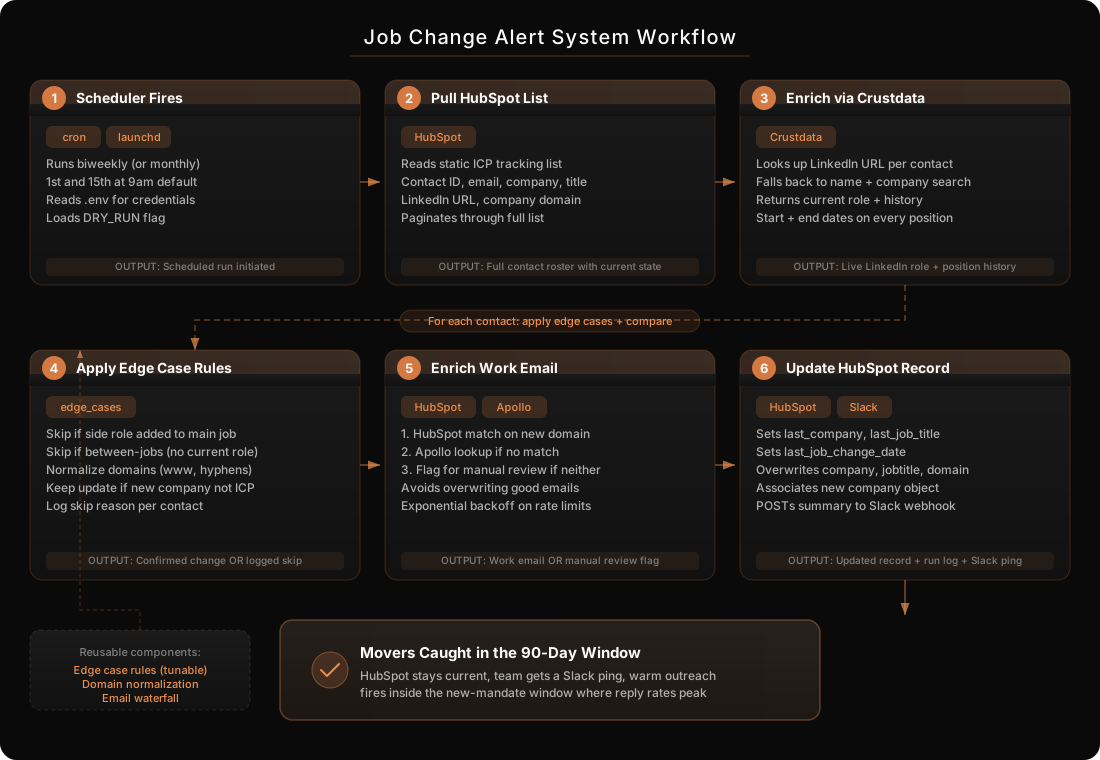
This workflow builds a fully automated system that watches a static HubSpot list of your ICP contacts, checks every contact’s current LinkedIn role via Crustdata every two weeks, applies a set of edge case rules to filter out false positives (board roles, advisory gigs, between-jobs noise), then enriches the new work email via Apollo and updates the HubSpot record in place. The contact’s previous company, title, and job-change date are captured as custom properties so you always know who just moved and when.
The system runs on a cron or launchd schedule, posts a Slack summary after each run, and writes a log file you can audit. Your team does nothing except get a Slack ping every other Monday listing who just changed jobs — perfect for a congratulatory email or a warm outbound sequence.
Before You Begin
Tools You’ll Need Open
- Claude Code (Terminal / IDE) — builds the entire system for you
- HubSpot (with admin access) — to create the tracking list, custom properties, and Private App
- Crustdata account — primary enrichment source for LinkedIn-based person + company data
- Apollo account — fallback for work email lookups
- A browser — for managing HubSpot, Crustdata, Apollo, and Slack settings
What You’ll Need Before Starting
- Python 3.10+ installed on your machine
- HubSpot Private App access token with scopes:
crm.objects.contacts.read,crm.objects.contacts.write,crm.lists.read,crm.schemas.contacts.write - Crustdata API key (primary enrichment source)
- Apollo API key (fallback for work email enrichment)
- Your HubSpot list ID for the tracking list (you will build the list in Step 1)
- Three custom contact properties in HubSpot:
last_company,last_job_title,last_job_change_date - Schedule preference — biweekly or monthly, and specific day/time
- Runtime environment — where this will run (local machine via cron, a VPS, Railway, etc.)
- (Optional) Slack webhook URL — for the after-run summary
How It Works
Prerequisites and Costs
- Python 3.10+ (free) - runtime for the monitoring service
- HubSpot (existing cost, no add-on required) - list, contact API, custom properties
- Crustdata API ($49-199/mo typical) - LinkedIn-based person + company enrichment
- Apollo API (free tier available, $49-99/mo for production volume) - work email fallback
- cron (macOS/Linux) or launchd (macOS) (free) - scheduling
- Slack webhook (free, optional) - post-run summary delivery
- Total: $50-200/mo depending on Crustdata and Apollo plan tiers and the size of your tracking list
Build Instructions
Step 1: Build the HubSpot Tracking List and Custom Properties
Why This Matters
This list is the master source the script reads from on every run. Contacts enter the list once and never exit — even after a job change — because you want one forever-tracked record per person. The custom properties are where the “last job” snapshot lands when a change is detected. If the list and properties are not set up correctly, nothing else will work.
What To Do
1. In HubSpot, create three custom contact properties (Settings -> Properties -> Contact properties -> Create property):
| Property Label | Internal Name | Type |
|---|---|---|
| Last Company | last_company | Single-line text |
| Last Job Title | last_job_title | Single-line text |
| Last Job Change Date | last_job_change_date | Date picker |
2. Create a static list called Job Change Tracking - ICP (Contacts -> Lists -> Create list -> Static list).
3. Populate it with contacts matching your ICP filters. Use this recipe as a starting point and tune to your business:
Job Title CONTAINS (any of):
- marketing, growth, demand gen, content, SDR manager, sales development, field events, lifecycle, operations, brand, creative, GTM, BDR, PR
Job Title DOES NOT CONTAIN:
- Any pure-engineering or pure-IT titles that slipped in (do NOT exclude “product” — you want product marketers; do NOT exclude “partner” — you want partner marketers)
Other filters:
- Contact is associated with a company
- Company employee count: <= 50 (ICP threshold — adjust to your sweet spot)
- Region: US, Canada, UK, Australia, New Zealand
4. Once the list is built, grab the list ID from the URL (the numeric ID at the end of the list URL) — you will paste it into your .env file in Step 4.
5. Critical setup rule: once a contact enters this list, they never exit. Make the list static (not active) so job updates do not kick them out. This is the master tracking list.
Expected Output
A static HubSpot list called Job Change Tracking - ICP with your ICP contacts in it, a numeric list ID, and three new custom contact properties ready to receive last-job snapshots.
Step 2: Get Your API Keys
Why This Matters
The script talks to three APIs. Getting all keys in one sitting, with the right scopes, avoids the most common failure mode: discovering mid-run that the Private App cannot update contacts or Crustdata rejects your plan’s requests.
What To Do
1. HubSpot Private App Token
Go to Settings -> Integrations -> Private Apps -> Create a Private App. Name it something like Job Change Monitor. Under Scopes, check:
crm.objects.contacts.readcrm.objects.contacts.writecrm.lists.readcrm.schemas.contacts.write
Click Create app and copy the access token. Starts with pat-....
2. Crustdata API Key
Log into your Crustdata dashboard and navigate to API settings. Copy the key. Crustdata is the primary enrichment source for LinkedIn-based person and company lookups — it provides the “current company” data that drives the entire job-change check.
3. Apollo API Key
Log into Apollo, go to Settings -> Integrations -> API, and copy the key. Apollo is used only as a fallback for work email lookups when HubSpot does not already have a matching email for the new company.
4. (Optional) Slack Incoming Webhook
In Slack, go to Apps -> Incoming Webhooks -> Add to Slack. Pick a channel for the post-run summary (e.g., #job-change-alerts). Copy the webhook URL.
Expected Output
Four API credentials saved in a password manager: a HubSpot pat-... token, a Crustdata API key, an Apollo API key, and (optional) a Slack webhook URL.
Step 3: Tell Claude Code to Build the System
Why This Matters
Instead of wiring three APIs by hand — each with its own pagination, rate limiting, and schema quirks — you hand Claude Code a full spec and it produces a clean, modular Python service. The prompt below encodes the exact edge case rules that separate a useful system from one that spams your team with false positives.
What To Do
1. Open Claude Code in a new project directory and paste this prompt:
Build a Python job-change-alert system that monitors a HubSpot
contact list for job changes, using Crustdata as the primary
enrichment source and Apollo as the work-email fallback. It
updates HubSpot records in place when a valid change is found.

Project structure:
job-change-alert/
  main.py                 # Entry point -- orchestrates a run
  hubspot_client.py       # HubSpot API interactions
  crustdata_client.py     # Crustdata API interactions
  apollo_client.py        # Apollo API interactions
  edge_cases.py           # All edge case logic
  domain_utils.py         # Domain normalization + comparison
  config.py               # Loads env vars
  .env.example
  requirements.txt
  logs/                   # Run logs (CSV or JSON per run)

Core flow (main.py):
1. Pull every contact in the HubSpot list defined by
   HUBSPOT_LIST_ID. Return: contact_id, email, first_name,
   last_name, company, jobtitle, linkedin_url, company_domain.
2. For each contact:
   a. Query Crustdata by LinkedIn URL (fall back to name+company
      if no URL). Return current position: company name,
      company domain, title, start_date, and the previous N
      positions including end_date for each.
   b. Run edge case rules (see below). If skipped, log the
      reason and move on.
   c. If a change is confirmed, normalize the old and new
      domains (see domain_utils) and compare.
   d. If the new domain != old domain: enrich work email --
      first check HubSpot for an existing work email matching
      the new company domain; if none, query Apollo for work
      email at the new company.
   e. Update HubSpot contact:
      - Set last_company = current company (before overwrite)
      - Set last_job_title = current jobtitle (before overwrite)
      - Set last_job_change_date = new role's start_date (from
        Crustdata)
      - Overwrite company, jobtitle, company_domain with new
        values
      - Overwrite email if a new work email was found
      - Associate contact with the new company object (create
        if it does not exist)
3. Write a run log (JSON) to logs/run-YYYY-MM-DD.json with:
   contacts_scanned, changes_detected, records_updated, skips
   (with reason), errors.
4. If SLACK_WEBHOOK_URL is set, POST a summary message to it.

Edge case rules (edge_cases.py):

Rule 1 -- Old job NOT ended, new role added -> IGNORE.
If the contact's most recent previous position has end_date
== null AND a newer position exists, treat them as still at
the original company. Covers: board seats, podcast hosts,
fractional/advisory roles, angel investments. Do NOT update.

Rule 2 -- Latest experience ended, no current role -> IGNORE.
If the latest position has an end_date and nothing after it,
they are between jobs. Do NOT update -- a "congrats on the new
role" email to someone who just got laid off is worse than
sending nothing.

Rule 3 -- New company does not match ICP -> STILL UPDATE.
Even if the new company fails your ICP filter, write the job
change to HubSpot. Downstream teams decide whether to reach
out; the data should stay clean.

Rule 4 -- Domain normalization.
Strip www., lowercase, and treat hyphenated variants as
matches (e.g., tofuhq.com vs tofu-hq.com). Implement in
domain_utils.normalize_domain() and domain_utils.
domains_match().

Email waterfall (only runs when a change is confirmed):
1. HubSpot: check if the contact already has an email whose
   domain matches the new company domain. If so, keep it.
2. Apollo: query for work email at the new company by name.
3. If neither returns a work email, keep the existing email
   and flag the contact for manual review (add a note or a
   "needs_manual_email_review" tag).

Environment variables (.env.example):
HUBSPOT_ACCESS_TOKEN=
CRUSTDATA_API_KEY=
APOLLO_API_KEY=
HUBSPOT_LIST_ID=
SLACK_WEBHOOK_URL=
RUN_CADENCE=biweekly   # or monthly
DRY_RUN=false          # if true, log changes but do not write

Non-functional requirements:
- Rate limit handling on all three APIs with exponential backoff
- A DRY_RUN mode that logs every decision without writing to
  HubSpot -- use this for the first run
- Idempotent: if run twice in a row, the second run should
  produce zero changes
- Logging: every contact decision logged with reason (updated,
  skipped, error) including contact_id so I can audit by ID
- Minimal deps: requests, python-dotenv, nothing exotic
2. Claude Code will scaffold the project:
job-change-alert/
-- main.py
-- hubspot_client.py
-- crustdata_client.py
-- apollo_client.py
-- edge_cases.py
-- domain_utils.py
-- config.py
-- .env.example
-- requirements.txt
-- logs/
3. Review the generated code. Pay special attention to edge_cases.py — these rules are what separate a useful system from a noisy one. Have Claude Code walk you through the logic if anything is unclear.
Expected Output
A clean, modular Python codebase that implements the full flow: HubSpot list read -> Crustdata enrichment -> edge case filtering -> Apollo email fallback -> HubSpot write, with a DRY_RUN switch and per-run logs.
Step 4: Configure .env and Run a Dry-Run
Why This Matters
Writing junk data into HubSpot is painful to undo. The first run should write nothing. A dry-run proves every piece of the pipeline works — API credentials, list read, enrichment, edge case logic, email waterfall — without risking your CRM.
What To Do
1. Install dependencies and fill in .env:
cd job-change-alert
python -m venv venv
source venv/bin/activate
pip install -r requirements.txt
cp .env.example .env
Edit .env:
HUBSPOT_ACCESS_TOKEN=pat-na1-...
CRUSTDATA_API_KEY=your_crustdata_key
APOLLO_API_KEY=your_apollo_key
HUBSPOT_LIST_ID=1234567
SLACK_WEBHOOK_URL=https://hooks.slack.com/services/...
RUN_CADENCE=biweekly
DRY_RUN=true
2. Run the dry-run:
python main.py3. Watch the console and check logs/run-YYYY-MM-DD.json. You should see:
- Total contacts read from the HubSpot list
- For each contact: the decision (updated / skipped / error) with reason
- Edge case rule hits (how many “between jobs”, how many “side role added”)
- A proposed change list (no writes) with old -> new for each field
4. Spot-check 5-10 contacts manually. Pick a few that the script says “changed jobs” and verify on LinkedIn directly. If any are wrong (e.g., the person did not actually change jobs), the edge case rules need tuning — ask Claude Code to adjust.
5. When the dry-run looks correct, flip DRY_RUN=false and run it for real:
python main.pyCheck HubSpot on a handful of updated contacts to confirm last_company, last_job_title, last_job_change_date, company, and jobtitle all look right.
Expected Output
A completed dry-run with a clean log file and a real run that correctly updates HubSpot records for contacts who actually changed jobs. No false positives.
Step 5: Schedule the Job and Wire Up Slack Reporting
Why This Matters
A job-change monitor that runs manually will die in a drawer. Schedule it on a cadence that matches hiring velocity in your market (biweekly is the sweet spot for most B2B ICPs), and get the output delivered somewhere your team actually looks.
What To Do
1. Pick your cadence:
- Biweekly — recommended. Fast enough to catch job changes in the 90-day “new mandate” window.
- Monthly — fine for smaller lists or slower-moving markets.
2. Schedule with cron (Linux / macOS):
crontab -eAdd a line (biweekly Monday 9am):
0 9 1,15 * * cd /path/to/job-change-alert && /path/to/venv/bin/python main.py >> logs/cron.log 2>&13. OR schedule with launchd on macOS (more reliable if your machine sleeps). Create ~/Library/LaunchAgents/com.yourcompany.job-change-alert.plist:
<?xml version="1.0" encoding="UTF-8"?>
<!DOCTYPE plist PUBLIC "-//Apple//DTD PLIST 1.0//EN"
  "http://www.apple.com/DTDs/PropertyList-1.0.dtd">
<plist version="1.0">
<dict>
    <key>Label</key>
    <string>com.yourcompany.job-change-alert</string>
    <key>ProgramArguments</key>
    <array>
        <string>/path/to/job-change-alert/venv/bin/python</string>
        <string>/path/to/job-change-alert/main.py</string>
    </array>
    <key>StartCalendarInterval</key>
    <array>
      <dict><key>Day</key><integer>1</integer><key>Hour</key><integer>9</integer></dict>
      <dict><key>Day</key><integer>15</integer><key>Hour</key><integer>9</integer></dict>
    </array>
    <key>StandardOutPath</key>
    <string>/path/to/job-change-alert/logs/stdout.log</string>
    <key>StandardErrorPath</key>
    <string>/path/to/job-change-alert/logs/stderr.log</string>
</dict>
</plist>
Load it:
launchctl load ~/Library/LaunchAgents/com.yourcompany.job-change-alert.plist4. Verify Slack reporting — the script should POST a summary after each run. The message should include: total contacts scanned, changes detected, records updated, skipped (with counts per reason), errors.
Example payload the bot sends:
*Job Change Alert - Run 2026-04-22*
Contacts scanned: 847
Changes detected: 12
Records updated: 12
Skipped: 23 (12 between-jobs, 8 side-role-added, 3 no-linkedin-url)
Errors: 0
Expected Output
A scheduled job that fires on your chosen cadence, runs unattended, and posts a summary to Slack. A log file for every run stored in logs/ for audit.
Step 6: Act on the Output
Why This Matters
The update itself is just data cleanup. The real value comes from the outreach that follows — a warm congratulations email within the first two weeks of a job change has some of the highest reply rates in B2B.
What To Do
1. Create a HubSpot workflow triggered by last_job_change_date being set in the last 14 days. Use it to:
- Add the contact to a “Recent Job Change” active list for your AE / BDR team
- Trigger a personalized email from the appropriate owner
- Assign the contact to the new-company owner if your team splits by account
2. For contacts flagged needs_manual_email_review: have someone on your team spot-check these once a week. Usually you can find the work email with 30 seconds of LinkedIn Sales Nav or a quick guess at the email pattern.
3. Review the Slack summaries weekly for trends. If you see a rising number of “between jobs” skips in a given industry, that is a leading indicator of layoffs — useful intel for your market intelligence even beyond outreach.
Expected Output
A closed loop: job changes detected by the script show up in HubSpot, trigger a workflow, and produce warm outreach within days of the change.
Quality Checklist
Verify Your Setup
HubSpot Setup
- Static list exists with your ICP contacts (not an active list)
- Three custom properties created:
last_company,last_job_title,last_job_change_date - Private App has all four required scopes
- List ID is correctly pasted into
.env
Script Behavior
DRY_RUN=trueproduces a full log with no HubSpot writes- Edge case rules catch board seats and between-jobs cases (spot-check a handful)
- Domain normalization handles
www.and hyphen variants - Email waterfall prefers existing HubSpot emails over Apollo lookups
- Re-running the script immediately produces zero changes (idempotent)
Scheduling
- cron or launchd job is loaded and next run time is in the future
- First scheduled run produced a Slack message and a log file
- Cron log has no permission errors (virtualenv path, log path writable)
Output Quality
- Spot-check 10 detected changes on LinkedIn directly — all are real
- “Skipped” reasons are accurate (a “between jobs” skip should actually be between jobs)
- No contacts have
last_companyequal to their current company
Common Mistakes to Avoid
Pitfalls That Will Trip You Up
Using an active list instead of a static list. Active lists re-evaluate on every change. The moment your script updates a contact’s company, they may drop out of the list (because they no longer match the entry criteria) — and the next run will miss them. Always use a static list.
Skipping the dry-run. Writing wrong data into HubSpot is expensive to undo, especially across hundreds of contacts. DRY_RUN=true takes 20 extra minutes to spot-check and saves you from a weekend of cleanup.
Ignoring edge case rule 1 (side roles). The most common false positive: the contact added a board seat or a podcast, Crustdata returns “new experience”, and the script overwrites their real job. Verify your edge case logic checks end_date == null on the previous position before flagging a change.
Ignoring edge case rule 2 (between jobs). Sending a “congrats on your new role” email to someone who just got laid off is worse than sending nothing. The script must detect “latest experience has an end date and nothing after” and skip.
Brittle domain comparison. Exact string matching on domains will flag tofuhq.com vs tofu-hq.com as a job change. Normalize aggressively: strip www., lowercase, and handle common variants in one utility.
Confusing HubSpot email properties. HubSpot has email (primary) and hs_email. The Private App token updates the email property. If you try to write to hs_email, it will silently ignore or fail. Always use email.
Running on a laptop that sleeps. Cron on a sleeping Mac silently misses runs. launchd with StartCalendarInterval will catch up on the next wake. For anything mission-critical, move it to a VPS or Railway.
Overshooting the list size on day one. Start with 100-500 contacts in the tracking list. Verify results. Scale up once you trust the output — a 10,000-contact run that produces garbage is a very expensive first run.
Handling Special Situations
Edge Cases and Adaptations
If Crustdata Cannot Find a Match
Not every contact has a clean LinkedIn URL in HubSpot. If Crustdata returns nothing, the script should:
- Try a fallback match on first name + last name + current company
- If still no match, log as
no_linkedin_matchand move on - Flag these contacts for manual LinkedIn URL enrichment so the next run works
Do not write anything to HubSpot for unmatched contacts.
If the Contact Has Multiple Current Roles
Some people list fractional/advisory roles with no end date alongside their main job. The edge case rules already handle this (Rule 1), but if you want to be stricter, weight roles by title seniority — a “CMO at Company A” is more likely the real job than “Advisor at Company B”. Have Claude Code add a tiebreaker in edge_cases.py.
If Apollo Cannot Find the Work Email
The email waterfall falls through to “flag for manual review”. In practice, for a well-maintained HubSpot:
| Source | Typical Match Rate |
|---|---|
| HubSpot existing email matches new domain | 20-30% |
| Apollo returns a valid work email | 40-50% |
| Neither — flagged for manual | 20-40% |
Build a small weekly habit of clearing the manual review queue. Fifteen minutes a week keeps this clean.
If the New Company Is Way Outside Your ICP
Rule 3 says: still update the record. You do not want to reach out yet, but data hygiene matters — and the person may later move again to another ICP-fit company. Keep the record current.
Scaling Beyond 10,000 Contacts
At 10k+ contacts, API rate limits start to matter:
| List Size | Run Duration | Crustdata API Calls |
|---|---|---|
| 500 | 5-10 min | ~500 |
| 2,000 | 20-30 min | ~2,000 |
| 10,000 | 2-3 hours | ~10,000 |
| 25,000+ | Consider a paid Crustdata plan and chunked runs | 25,000+ |
For lists larger than 10,000, add chunking logic (process 500 at a time, checkpoint progress, resume on failure). Ask Claude Code to add resume-from-checkpoint to main.py.
If You Want Multi-Level History
By design, this system only tracks the last job change. If you want a full history (last 3-5 roles), add a job_change_history custom property (multi-line text or JSON) in HubSpot and append each change. For most outbound use cases, last-only is sufficient.
Measuring Success
Tracking and Iterating on Results
Key Metrics to Track
| Metric | Healthy Range | Action If Off |
|---|---|---|
| Job changes detected per run | 1-5% of tracked contacts | If 0, check Crustdata matching. If >10%, check for false positives. |
| False positive rate (spot check) | <5% | Tune edge case rules in edge_cases.py |
| Apollo email match rate | 40-60% | If much lower, upgrade Apollo plan or improve company-name input |
| Run duration | Under 10s per contact | If slower, add rate-limit-aware concurrency |
| Outbound reply rate on recent changes | 2-5x normal cold | If flat, the signal is not reaching the person in time — check cadence |
Timeline Expectations
| Timeframe | What to Expect |
|---|---|
| Day 1 | Dry-run completes, first real run writes a small batch of updates |
| Week 1 | 5-20 real job changes caught, team starts acting on them |
| Month 1-2 | Cadence stabilizes, team builds muscle around warm job-change outreach |
| Month 3+ | Job-change outreach becomes one of the highest-reply-rate plays on the team |
Signs Your System Is Working
- Your SDR team asks “can we track more segments” — they want to expand the list
- Response rates on job-change emails are noticeably higher than cold
- You catch a mover within 14 days of the change (the sweet spot for new-mandate outreach)
- Slack summaries are boring — meaning the numbers make sense, no spikes
Signs You Need to Iterate
- The Slack summary shows lots of “skipped - no_linkedin_match” — go enrich LinkedIn URLs on your list
- False positive rate above 10% on spot-checks — tune edge case rules
- Nobody on your team acts on the alerts — move the Slack post to a higher-traffic channel or trigger a HubSpot workflow automatically
- Crustdata rate-limits you — chunk the run or upgrade the plan
The Prompts
Prompt 1: Build the Full System
Paste this into Claude Code in an empty project directory:
Build a Python job-change-alert system that monitors a HubSpot
contact list for job changes, using Crustdata for LinkedIn-based
enrichment and Apollo as a work-email fallback. It should update
HubSpot records in place when a valid job change is found.

The system must:
1. Pull all contacts from a HubSpot list (env HUBSPOT_LIST_ID)
2. For each contact: query Crustdata for current LinkedIn role
3. Apply edge case rules (see below) to filter false positives
4. Look up work email (HubSpot match first, Apollo fallback)
5. Update HubSpot: move current company/title/domain into
   last_company, last_job_title, set last_job_change_date,
   overwrite company/jobtitle with new values, update email
   if a new work email was found, associate with new company
6. Write a per-run JSON log with counts and per-contact decisions
7. POST a summary to SLACK_WEBHOOK_URL (if set)

Edge case rules (critical):
- Rule 1: If old position end_date is null AND a new position
  exists, IGNORE (board seats, fractional, podcasts)
- Rule 2: If latest experience has an end_date and no current
  role, IGNORE (between jobs)
- Rule 3: If the new company is not ICP, STILL UPDATE (data
  hygiene)
- Rule 4: Normalize domains (strip www, lowercase, handle
  hyphen variants)

Must include:
- DRY_RUN env flag (logs changes but does not write)
- Rate-limit handling with exponential backoff on all three APIs
- Idempotent (re-running produces zero changes)
- Modular file structure: main.py, hubspot_client.py,
  crustdata_client.py, apollo_client.py, edge_cases.py,
  domain_utils.py, config.py

Dependencies: requests, python-dotenv only.

Here are my credentials: [paste your HUBSPOT_ACCESS_TOKEN,
CRUSTDATA_API_KEY, APOLLO_API_KEY, HUBSPOT_LIST_ID]
Prompt 2: Tune the Edge Case Rules
Review my edge_cases.py file. I want to adjust the rules:

1. Rule 1 (side roles): Right now it fires if ANY previous
   position has end_date == null. Change it to: only skip if
   the MOST RECENT previous position has end_date == null AND
   the new position started AFTER that previous position. This
   handles people who have had stable side roles for years.

2. Rule 2 (between jobs): Add a grace window. If the latest
   experience ended within the last 30 days and there is no
   current role, skip. But if the latest ended more than 90
   days ago with no current role, flag for manual review --
   they may have started something Crustdata has not picked
   up yet.

3. Add a new Rule 5: If the new company is the same as a
   previous employer from 5+ years ago (boomerang), still
   update but also add a tag "boomerang_hire" so the team
   can personalize the outreach.

Update the code and write unit tests covering each rule.
Prompt 3: Add Chunking for Large Lists
Modify main.py to process the HubSpot list in chunks of 500
contacts. After each chunk, write a checkpoint file
(.checkpoint.json) with the last-processed contact ID. On
startup, if .checkpoint.json exists, resume from that contact
ID instead of starting over. Delete the checkpoint after a
successful full run. This lets me safely run 10k-contact
lists without losing progress on failure.
Prompt 4: Add HubSpot Workflow Trigger
After a successful run, call the HubSpot API to enroll every
updated contact into a workflow. The workflow ID is passed
via env HUBSPOT_WORKFLOW_ID_RECENT_JOB_CHANGE. Use the
HubSpot workflow enrollment API. If HUBSPOT_WORKFLOW_ID_*
is not set, skip this step silently.
Expected Results
- One-time setup: 2-3 hours (HubSpot list + properties, API keys, Claude Code build, dry-run)
- Per-run duration: 10-30 minutes for a 1,000-contact list; 2-3 hours for 10,000
- Detection rate: 1-5% of tracked contacts change jobs per biweekly run, in a typical B2B ICP
- Outbound impact: 2-5x higher reply rate on job-change outreach vs. cold
- Team effort: Zero, after setup. Optional 15 min/week to clear the manual-email review queue
- Scalability: Works for 100 to 25,000 contacts; add chunking above 10k
- Monthly cost: $50-200 depending on Crustdata and Apollo plan tiers and list size
Build This With AI Assistance
Download the Markdown file below and upload it to your preferred AI tool to have it walk you through the build.
✨ Let AI Build This For You
Download the implementation guide and let an agent build this for you.
You can follow the manual steps below, but it would be a lot easier to