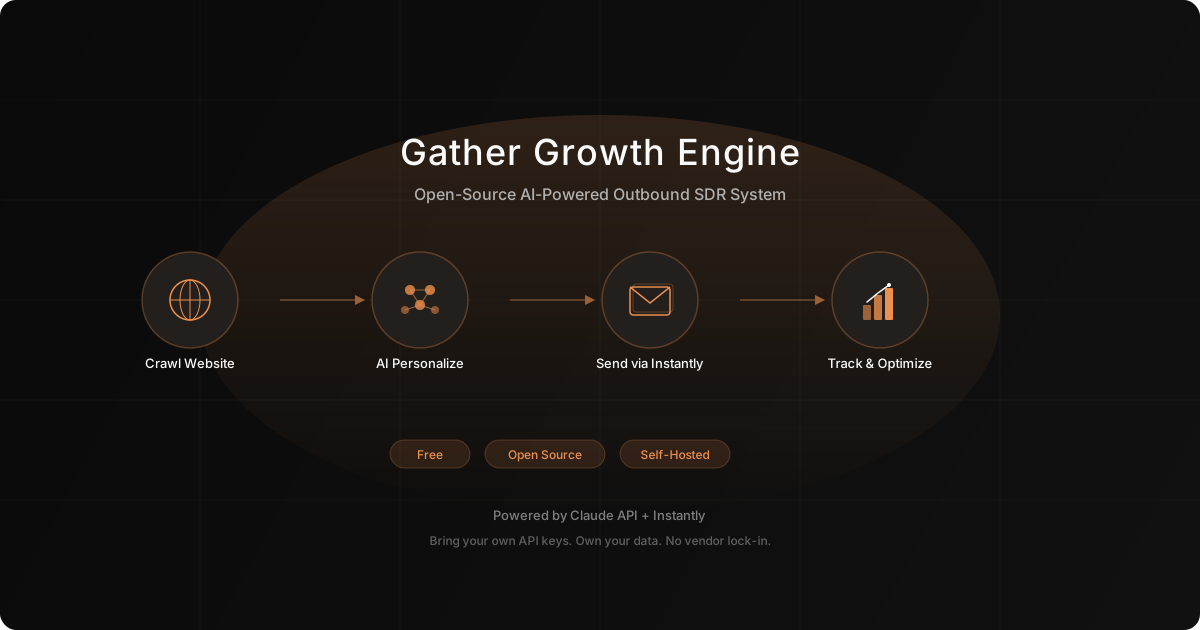
Gather Growth Engine: Build an AI-Powered Outbound SDR System for Free
Deploy Gather's free, open-source Growth Engine to automate your entire outbound sales pipeline — from website crawling and ICP generation to AI-personalized email campaigns via Instantly.


Workflow Description
This is a workflow that uses Gather’s open-source Growth Engine to build a fully automated outbound sales system. The Growth Engine is a self-hosted Next.js application that handles the entire outbound pipeline: it crawls your website to understand your product, generates email playbooks tailored to your ideal customer profile, imports and verifies leads, uses Claude to write hyper-personalized emails for every contact, deploys campaigns through Instantly, and tracks performance to optimize over time. Built by Mayank M. at Gather because they needed it themselves, the tool is free, open source, and runs on your own infrastructure with your own API keys.
Before You Begin
Tools You’ll Need Open
- Terminal / command line — for installation and running the dev server
- GitHub (github.com) — to clone the repository
- Node.js (v18+) — runtime for the application
- A text editor (VS Code recommended) — for editing .env configuration
- Anthropic Console (console.anthropic.com) — to get your Claude API key
- Instantly dashboard (instantly.ai) — for email sending setup and API key
- Browser — the app runs as a local web app at localhost:3000
What You’ll Need Before Starting
- Company website URL (the crawler will analyze this)
- Ideal Customer Profile details (industry, job titles, company size, pain points)
- A lead list in CSV format (with fields: name, email, company, title at minimum)
- Anthropic API key (from console.anthropic.com)
- Instantly account and API key
- Email sending domain configured in Instantly (warmed up for at least 2 weeks)
How It Works
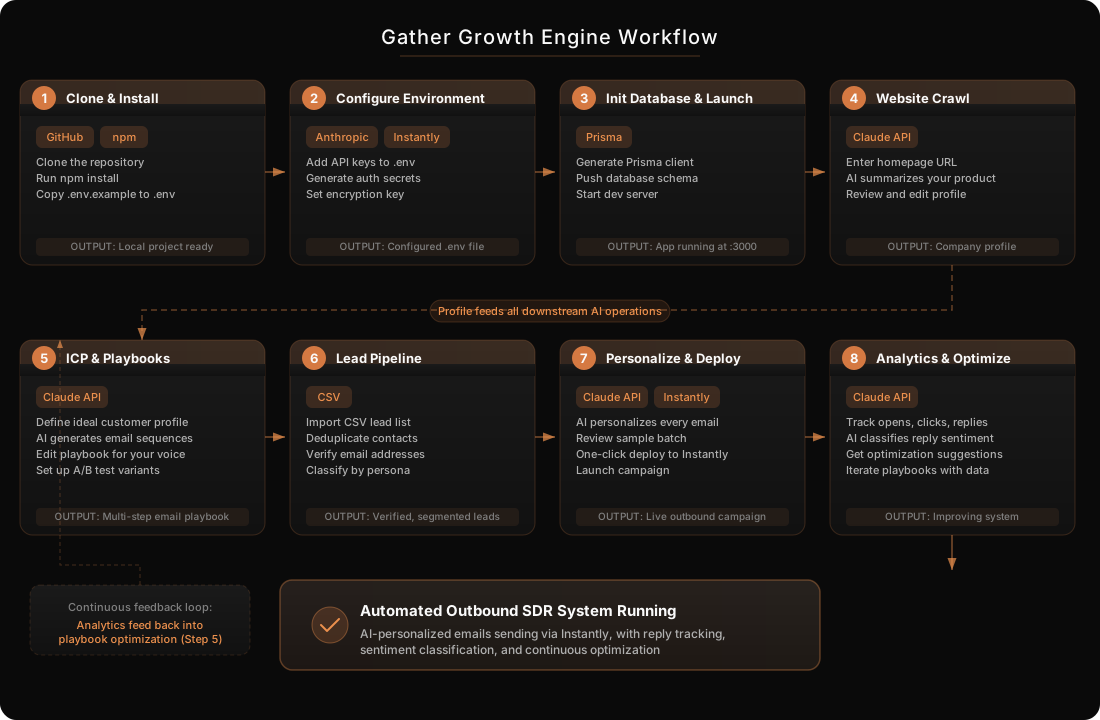
Prerequisites and Costs
- Gather Growth Engine (free, open source) — the core application from GitHub
- Node.js v18+ (free) — JavaScript runtime required to run the application
- Anthropic Claude API ($5-20/mo) — powers website analysis, playbook generation, email personalization, and reply classification
- Instantly ($30-50/mo) — email sending infrastructure, warmup, and deliverability management
- A warmed email domain (included in Instantly setup or via separate provider)
- Optional: PostgreSQL (free tier on Railway/Supabase) — for production deployment (SQLite works for local development)
Build Instructions
Step 1: Clone and Install the Growth Engine
Why This Matters
You need a local running instance before anything else. The Growth Engine is a self-hosted Next.js app, meaning you control your data, your costs, and your infrastructure. No vendor lock-in, no monthly platform fees.
What To Do
1. Open your terminal and clone the repository:
git clone https://github.com/mayankgbh/gather-growth-engine.git
cd gather-growth-engine
2. Install all dependencies:
npm install3. Copy the example environment file:
cp .env.example .env4. Open the .env file in your editor. You will fill in the required values in the next step.
Expected Output
A local gather-growth-engine/ directory with all dependencies installed and a .env file ready for configuration.
Step 2: Configure Your Environment Variables
Why This Matters
The Growth Engine connects to external APIs (Anthropic for AI, Instantly for email sending) through API keys stored in environment variables. Incorrect configuration here will prevent the entire system from working. The encryption key protects your stored credentials in the database.
What To Do
1. Get your Anthropic API key:
- Go to console.anthropic.com
- Navigate to Settings, then API Keys
- Create a new key and copy it
2. Get your Instantly API key:
- Log into your Instantly dashboard
- Navigate to Settings, then Integrations
- Copy your API key
3. Generate a secure NEXTAUTH_SECRET (run in terminal):
openssl rand -base64 324. Generate an ENCRYPTION_KEY for securing stored credentials:
openssl rand -hex 325. Edit your .env file with these required values:
DATABASE_URL="file:./dev.db"
NEXTAUTH_SECRET="[paste-your-generated-secret]"
NEXTAUTH_URL="http://localhost:3000"
ENCRYPTION_KEY="[paste-your-generated-hex-key]"
6. (Optional) Configure Google OAuth and Resend if you want Google sign-in or email verification for multi-user setups.
Expected Output
A fully populated .env file with all required secrets and API keys configured.
Step 3: Initialize the Database and Launch
Why This Matters
The Growth Engine uses Prisma ORM with SQLite for local development (or PostgreSQL for production). The database stores your leads, campaigns, playbooks, and analytics data. Without initialization, the app cannot persist anything.
What To Do
1. Generate the Prisma client:
npx prisma generate2. Push the schema to your database:
npx prisma db push3. Start the development server:
npm run dev4. Open your browser to http://localhost:3000
5. Create your account. The first user who signs up becomes the workspace admin.
Expected Output
The Growth Engine dashboard running at localhost:3000, with an empty workspace ready for configuration. You should see the onboarding flow prompting you to set up your company profile.
Step 4: Run the Website Crawler to Build Your Company Profile
Why This Matters
The Growth Engine uses Claude to crawl and summarize your company’s homepage. This summary becomes the foundation for all AI-generated content, including your email playbooks and per-lead personalization. The better your company profile, the more relevant your outbound emails will be.
What To Do
1. In the Growth Engine dashboard, navigate to your workspace settings.
2. Enter your company’s homepage URL.
3. Click “Crawl Website.” The system sends your homepage content to Claude, which generates a structured summary of:
- What your company does
- Who it serves
- Key value propositions
- Product features and differentiators
4. Review the AI-generated company summary carefully. Pay special attention to:
- Value proposition clarity (is it specific, not generic?)
- Target audience accuracy (does it match your actual ICP?)
- Feature descriptions (are they correct and complete?)
5. Edit any inaccuracies manually. Claude does a good job, but it may miss nuances about your product that only you know.
6. Save the finalized company profile.
Expected Output
A comprehensive company profile that accurately describes your product, value proposition, and target market. This profile is referenced every time the AI generates email content.
Step 5: Define Your ICP and Generate Email Playbooks
Why This Matters
The ICP (Ideal Customer Profile) and playbook system is what makes the Growth Engine’s personalization effective. Instead of generic cold emails, the AI generates multi-step email sequences tailored to specific personas. This step converts your sales strategy into an executable, automated system.
What To Do
1. Navigate to the Playbooks section in the dashboard.
2. Define your ICP parameters:
- Target job titles (e.g., VP of Marketing, Head of Growth, CMO)
- Company size range (e.g., 50-500 employees)
- Industries (e.g., B2B SaaS, FinTech, E-commerce)
- Key pain points your product solves for this persona
3. Click “Generate Playbook.” Claude analyzes your company profile combined with your ICP definition to create a multi-step email sequence.
4. Review the generated playbook, which includes:
- Initial outreach email template
- Follow-up sequence (typically 3-5 emails spaced over 2-3 weeks)
- Subject line variations for A/B testing
- Personalization variables (the “slots” the AI fills for each lead)
5. Edit the playbook to match your voice and selling style. The AI gets the structure right, but you know your market best. Adjust:
- Tone (more casual? more formal?)
- Value propositions emphasized
- Call-to-action style (meeting request? resource share? question?)
6. Create additional playbooks for different ICPs if you target multiple segments. A playbook for VPs of Sales should sound different than one for Heads of Engineering.
Expected Output
One or more email playbooks, each containing a multi-step sequence with personalization variables, ready to be combined with lead data.
Step 6: Import and Process Your Lead Pipeline
Why This Matters
The lead pipeline handles CSV import, deduplication, email verification, and persona classification. Clean, verified data is critical because sending to invalid emails destroys your sender reputation. Persona classification ensures each lead gets matched to the right playbook.
What To Do
1. Navigate to the Leads section.
2. Prepare your CSV file. Required columns at minimum:
- First name
- Last name
- Email address
- Company name
- Job title
Optional but recommended columns: LinkedIn URL, company size, industry, company website.
3. Upload your CSV file and map columns to the Growth Engine’s fields.
4. The system automatically processes your leads:
- Deduplicates against existing contacts
- Verifies email addresses
- Classifies each lead into a persona based on job title and other data
5. Review the pipeline results:
- How many leads passed verification
- How leads were distributed across personas
- Any leads flagged for manual review
6. Remove or fix any leads marked as problematic. Common issues include catch-all domains, role-based emails (info@, sales@), and obviously incorrect data.
Expected Output
A clean, deduplicated, verified lead list with each lead classified into a persona that maps to one of your playbooks.
Step 7: Generate Personalized Emails and Deploy Campaigns
Why This Matters
This is where the AI does the heavy lifting. For each lead, Claude combines your company profile, the relevant playbook, and the lead’s specific data to generate a fully customized email. One-click deployment to Instantly means you go from personalized drafts to a live campaign in minutes.
What To Do
1. Navigate to the Campaigns section.
2. Select the playbook and lead segment for this campaign.
3. Click “Generate Emails.” For each lead, Claude generates:
- Personalized subject lines referencing the lead’s company or role
- Custom email body that weaves in the lead’s specific pain points
- Natural-sounding personalization that does not feel templated
- Multiple steps in the sequence, each building on the previous
4. Review a sample of generated emails. Check at least 10-15% of the batch:
- Does the personalization feel natural and specific?
- Are company and role references accurate?
- Is the tone appropriate for the persona?
- Are there any hallucinated details?
5. Set up A/B testing if desired. The system supports subject line variants with a 50/50 split so you can measure what resonates.
6. Connect to Instantly:
- Navigate to Settings, then Integrations
- Enter your Instantly API key if not already configured
- Select your sending account and warmed domain
7. Click “Deploy to Instantly” to push the campaign.
8. Monitor initial sends in both the Growth Engine dashboard and Instantly to confirm emails are going out.
Expected Output
A live outbound email campaign running through Instantly, with fully AI-personalized emails for every lead in your segment.
Step 8: Monitor Analytics and Optimize
Why This Matters
The Growth Engine tracks opens, clicks, and replies, then uses Claude to classify reply sentiment (interested, objection, out of office, not interested). This feedback loop lets you continuously improve your playbooks, targeting, and messaging based on real data.
What To Do
1. Navigate to the Analytics dashboard.
2. Monitor key metrics daily:
- Open rate (target: 40-60% for well-personalized cold email)
- Reply rate (target: 5-15%)
- Positive reply rate (target: 2-8%)
- Bounce rate (should be under 3% with verification)
3. Review AI-classified replies:
- Interested leads — move to your sales pipeline immediately
- Questions or objections — identify patterns for playbook improvement
- Not interested — note reasons for ICP refinement
- Out of office — the system handles follow-up timing
4. Use the system’s optimization suggestions. The Growth Engine analyzes performance by persona and vertical to recommend:
- Which subject lines perform best
- What personalization angles resonate
- Which personas convert at higher rates
5. Iterate on your playbooks based on data:
- Update email copy for low-performing sequences
- Refine ICP parameters based on positive reply patterns
- Create new playbooks for high-converting segments
- Adjust follow-up cadence based on reply timing
Expected Output
A continuously improving outbound system with clear metrics on what is working, which leads are converting, and how to refine your approach over time.
Quality Checklist
Quality Checkpoint
Technical Setup
- Growth Engine running without errors at localhost:3000
- All environment variables configured and validated
- Database initialized with Prisma (no migration errors)
- Anthropic API key tested (company crawl completes successfully)
- Instantly API key connected and sending account selected
Data Quality
- Company profile reviewed and corrected for accuracy
- At least one ICP defined with specific parameters (not generic)
- Lead CSV cleaned before import (no obvious duplicates, valid email format)
- Lead persona classification reviewed and adjusted
- At least one playbook generated, reviewed, and edited to match your voice
Campaign Readiness
- Sample of 10-15% of generated emails manually reviewed
- Personalization feels natural and specific (not “Dear [First Name]” level)
- Subject line A/B test configured
- Sending domain warmed up in Instantly (minimum 2 weeks of warmup)
- Daily sending limits set appropriately (start with 20-30/day per account)
Common Mistakes to Avoid
Pitfalls That Derail Your Outbound Campaigns
Skipping Email Domain Warmup Deploying campaigns from a cold domain will land you in spam immediately. Warm your sending domain for at least 2 weeks in Instantly before launching your first real campaign. There are no shortcuts here. A flagged domain takes months to recover.
Using a Vague Company Profile The AI-generated company summary feeds every email it writes. If your company profile is generic (“We help businesses grow”), every email will be generic too. Spend time making your company profile specific, detailed, and accurate. This is a one-time investment that pays off across every campaign.
Importing Unverified Lead Lists Sending to invalid emails tanks your sender reputation fast. Even though the Growth Engine has built-in verification, start with the cleanest data you can. Remove catch-all domains and role-based emails (info@, sales@) before import.
Sending Too Many Emails Too Fast New senders who blast 500 emails on day one get flagged. Start with 20-30 emails per day per sending account and increase gradually over 2-4 weeks. Patience in the early days prevents months of deliverability problems.
Not Reviewing AI-Generated Emails Claude writes good personalized emails, but it is not perfect. It can hallucinate company details or misattribute features. Always review a meaningful sample before deploying. Catching one bad email before it sends is worth the 15 minutes.
Ignoring Reply Classification Data The system classifies replies for a reason. If you see patterns in objections (“We already use X” or “Not relevant to us”), that signals your ICP or messaging needs adjustment. Treat negative replies as research data, not just rejections.
Using One Playbook for Everyone Different personas have different pain points. A VP of Sales cares about pipeline metrics. A Head of Marketing cares about lead quality. A CTO cares about integrations. Create separate playbooks for each persona rather than forcing one generic sequence on everyone.
Neglecting to Update Playbooks What works in month one may not work in month three. Markets shift, competitors launch features, and messaging gets stale. Revisit and refresh your playbooks every 4-6 weeks based on analytics data.
Handling Special Situations
Edge Cases and Adaptations
If You Do Not Have a Lead List Yet
- Use LinkedIn Sales Navigator to build a targeted list based on your ICP
- Export with a tool like Apollo, PhantomBuster, or Clay
- Ensure you have at minimum: first name, last name, email, company, job title
- Run the list through an external verification service (like ZeroBounce or NeverBounce) before importing large lists
If Your Company Is Pre-Product or Early Stage
- Focus the company profile on the problem you solve, not features you have not built yet
- Use the outbound system for discovery and validation conversations, not hard selling
- Adjust playbook tone from “Here is our solution” to “We are building X, would love your perspective”
- Lower volume expectations. Quality over quantity matters more at this stage
If You Want to Deploy to Production (Not Just Local)
- Switch DATABASE_URL from SQLite to a PostgreSQL connection string (Railway or Supabase free tiers work)
- Deploy to Vercel (the app is built on Next.js 14, which Vercel handles natively) or Railway
- Set all environment variables in your hosting platform’s dashboard
- Run database migrations:
npx prisma migrate deploy - Configure a custom domain if desired
- Set up Google OAuth for multi-user access if your team needs it
If Instantly Is Not Your Preferred Sending Tool
- The Growth Engine currently integrates directly with Instantly
- For other ESPs, you can export the generated personalized emails as CSV
- Import the CSV into your preferred tool (Smartlead, Lemlist, etc.)
- You lose the one-click deployment but retain the AI personalization, which is the core value
Adapting for Different Email Sending Volumes
| Volume | Recommended Approach |
|---|---|
| Under 100/week | One sending account, one domain, start slowly |
| 100-500/week | 2-3 sending accounts across 2 domains |
| 500-2,000/week | Multiple accounts, 3+ domains, inbox rotation in Instantly |
| 2,000+/week | Enterprise Instantly plan, dedicated IP, multiple domains with DKIM/DMARC |
Measuring Success
Tracking and Iterating on Results
Key Metrics to Track
| Metric | Healthy Range | Action If Below |
|---|---|---|
| Open Rate | 40-60% | Improve subject lines, check deliverability |
| Reply Rate | 5-15% | Improve personalization, refine ICP |
| Positive Reply Rate | 2-8% | Adjust value proposition or offer |
| Bounce Rate | Under 3% | Improve list quality, add verification |
| Unsubscribe/Spam Rate | Under 0.5% | Reduce volume, improve targeting |
Timeline Expectations
| Timeframe | What to Expect |
|---|---|
| Day 1-3 | System installed, configured, first playbook created |
| Week 1 | First test campaign deployed (small batch, 20-50 leads) |
| Week 2-3 | First replies coming in, iterate on messaging based on feedback |
| Month 1-2 | Playbooks refined, volume scaled, reply patterns becoming clear |
| Month 2-3 | Repeatable system producing qualified conversations weekly |
Signs Your System Is Working
- Consistent positive replies from your target ICP
- Replies reference specific personalization (showing the AI customization lands)
- Booked meetings from outbound sequences
- Improving metrics week over week as you iterate on playbooks
- Multiple playbooks performing well across different personas
Signs You Need to Iterate
- Open rates below 30% after the first week (deliverability or subject line problem)
- Reply rates below 2% after 3+ weeks of sending (messaging or targeting problem)
- High unsubscribe or spam complaint rates (targeting or frequency problem)
- Replies consistently saying “not relevant” or “wrong person” (ICP mismatch)
- No improvement in metrics after 4+ weeks (fundamental positioning issue)
Iteration Checklist
If results are poor after 4-6 weeks:
- Re-examine your company profile. Is it specific enough for good personalization?
- Review ICP parameters. Are you targeting the right people?
- Audit playbook messaging. Does it speak to real pain points?
- Check deliverability. Are emails landing in inbox or spam?
- Analyze reply patterns. What objections keep coming up?
- Test new angles. Try different value propositions or CTAs
The Prompts
Prompt 1: Company Profile Refinement
Use this prompt with Claude (chat) after the Growth Engine auto-generates your company profile. Paste the auto-generated profile and ask Claude to improve it.
I'm using the Gather Growth Engine for outbound sales automation. The system crawled my website and generated this company profile. I need you to review it and improve it for better email personalization.

**Auto-generated profile:**
[PASTE THE PROFILE FROM THE GROWTH ENGINE HERE]

**My actual company website:** [YOUR WEBSITE URL]

**Review and improve the profile for these criteria:**

1. **Specificity** -- Replace any vague language ("helps businesses grow") with concrete descriptions of what the product does and who it helps
2. **Value proposition clarity** -- Is the core benefit stated in one clear sentence?
3. **Target audience accuracy** -- Does the profile correctly identify who buys this product?
4. **Differentiators** -- Are the things that make this product different from competitors clearly stated?
5. **Pain points** -- Does the profile mention the specific problems the product solves?

**Output:** A revised company profile that I can paste back into the Growth Engine. Keep the same structure but make every sentence more specific and useful for email personalization.
Prompt 2: ICP Validation and Expansion
Use this prompt to validate your ICP definition before generating playbooks.
I'm setting up an outbound sales system for my company. Before I generate email playbooks, I need to validate my Ideal Customer Profile.

**My company profile:**
[PASTE YOUR COMPANY PROFILE]

**My current ICP definition:**
[PASTE YOUR ICP: job titles, company size, industries, pain points]

**Please analyze and provide:**

1. **Validation** -- Does this ICP align with the company profile? Are these the people most likely to buy?
2. **Gaps** -- Am I missing any high-potential segments?
3. **Prioritization** -- Rank the personas by likely conversion probability and explain why
4. **Persona refinement** -- For each persona, suggest:
   - The specific pain point to lead with
   - The ideal company trigger event (just raised funding, new hire, etc.)
   - The best CTA for this persona type
5. **Anti-personas** -- Who should I explicitly exclude to avoid wasting sends?

**Output:** A refined ICP document with prioritized personas, each with specific targeting criteria and messaging angles.
Prompt 3: Playbook Email Sequence Review
Use this prompt to get Claude to critique a generated playbook before you deploy it.
Review this email playbook for my outbound campaign. I need honest, specific feedback.

**Target persona:** [DESCRIBE THE PERSONA]
**Company profile:** [BRIEF DESCRIPTION OF YOUR PRODUCT]

**Playbook content:**
[PASTE THE FULL PLAYBOOK FROM THE GROWTH ENGINE]

**Critique each email in the sequence for:**

1. **Subject line effectiveness** -- Would you open this? Is it specific enough? Too salesy?
2. **Opening line** -- Does it earn the right to keep reading? Is it personalized or generic?
3. **Value proposition** -- Is the benefit clear within the first 2 sentences?
4. **Personalization depth** -- Does it feel like it was written for this specific person, or could it be sent to anyone?
5. **CTA clarity** -- Is the ask clear, low-friction, and appropriate for the relationship stage?
6. **Sequence logic** -- Does each follow-up add new value or just nag?
7. **Length** -- Is each email under 150 words? Cold emails that are too long get ignored.

**Output:** Specific, actionable edits for each email in the sequence. Rewrite any weak sections.
Prompt 4: Email Personalization Quality Audit
Use this prompt to spot-check the AI-generated personalized emails before deploying.
I'm about to deploy a batch of AI-personalized cold emails. Before sending, I need you to audit this sample for quality and accuracy.

**Company profile context:** [BRIEF DESCRIPTION]
**Playbook being used:** [WHICH PERSONA/PLAYBOOK]

**Sample of generated emails (5-10):**
[PASTE THE GENERATED EMAILS WITH THE LEAD DATA THEY WERE GENERATED FOR]

**Audit each email for:**

1. **Factual accuracy** -- Are the company name, job title, and industry references correct based on the lead data?
2. **Hallucination check** -- Did the AI make up any facts about the lead's company that are not in the source data?
3. **Natural tone** -- Does each email read like a human wrote it, or does it feel robotic/templated?
4. **Personalization quality** -- Is the personalization meaningful (references real pain points) or superficial (just name insertion)?
5. **Consistency** -- Do the emails feel varied enough, or are they clearly from a template?

**Output:** Flag any emails with issues. For flagged emails, explain the problem and suggest the fix. Give an overall quality score (1-10) for the batch.
Prompt 5: Campaign Performance Analysis
Use this prompt after 2-4 weeks of campaign data to diagnose and improve performance.
Analyze my outbound campaign performance and recommend specific improvements.

**Campaign metrics:**
- Emails sent: [NUMBER]
- Open rate: [PERCENTAGE]
- Reply rate: [PERCENTAGE]
- Positive reply rate: [PERCENTAGE]
- Bounce rate: [PERCENTAGE]
- Top-performing subject line: [SUBJECT LINE]
- Lowest-performing subject line: [SUBJECT LINE]

**Current playbook summary:**
[PASTE THE PLAYBOOK STRUCTURE AND KEY MESSAGING]

**Sample of positive replies:**
[PASTE 3-5 POSITIVE REPLIES]

**Sample of common objections:**
[PASTE 3-5 NEGATIVE REPLIES OR OBJECTIONS]

**Analyze and provide:**

1. **Diagnosis** -- Based on the metrics, what is the primary bottleneck? (Deliverability? Subject lines? Messaging? Targeting?)
2. **Subject line recommendations** -- Based on what worked and what did not, suggest 5 new subject line variants to test
3. **Messaging adjustments** -- Based on positive replies, what messaging is resonating? Based on objections, what needs to change?
4. **ICP refinement** -- Based on who is responding positively, should the targeting be adjusted?
5. **Sequence optimization** -- Which step in the sequence has the highest drop-off? How should it be improved?

**Output:** A prioritized action plan with the top 3 changes to make for the next campaign iteration.
Expected Results
After implementing this workflow:
- Initial setup: 2-3 hours (includes installation, configuration, first crawl, and first playbook)
- Per campaign: 30-60 minutes (lead import, review generated emails, deploy)
- Monthly cost: $30-80 (free tool + Anthropic API + Instantly subscription)
- Email quality: Fully AI-personalized outbound at scale, not mail-merge templates
- Scalability: Add ICPs, playbooks, and lead segments without additional tool cost
- Data ownership: Self-hosted, open source. Your data stays on your infrastructure
Build This With AI Assistance
Download the Markdown file below and upload it to your preferred AI tool to have it walk you through the build.
✨ Let AI Build This For You
Download the implementation guide and let an agent build this for you.
You can follow the manual steps below, but it would be a lot easier to